 Daytiles
How to track habits on iPhone
Your iPhone already has a few ways to track a habit, and each works for some things. Here's an honest look at Reminders, Notes, paper, Apple Health and habit apps, and how to pick.
The short version
- Reminders is good at nudging you, but bad at showing a record.
- Notes or paper work if you'll actually open them every day.
- Apple Health tracks some habits by itself, like steps and workouts.
- A habit app is built for the record: days done, runs, and checking off in one tap.
Daytiles keeps track of it for you, free on iPhone, iPad and Apple Watch. Get it on the App Store.
What good tracking needs
Whatever you use, tracking a habit works best when it does three things:
- It's fast. Logging should take a second or two. If it's a chore, you'll stop.
- It shows a record. Seeing a run of days is what keeps you going, and it tells you honestly how often you're really doing it.
- It's where you'll see it. A tracker you have to remember to open is one more habit to build.
With that in mind, here's what's on your iPhone already, and what a habit app adds.
Reminders
Apple's Reminders app can repeat a reminder every day, on weekdays or on a custom schedule. It's free, it's already there, and it's good at one thing: telling you to do something at a set time or place.
Where it falls short is the record. When you check off a repeating reminder, the next one appears, and there's no easy view of how many days you did it this month. It's a to-do list, built to clear things off, not to show you a streak.
Good for: one or two nudges a day, like taking medicine. Less good for: seeing your progress.
Notes, a calendar, or paper
A simple grid works: days across the top, habits down the side, a check in each box. You can do it in Notes with a table or a checklist, in a spreadsheet, or on paper on the fridge. The "don't break the chain" trick of crossing off days on a wall calendar is the same idea.
Paper on the fridge has a real advantage: you see it every day without opening anything. A note on your phone doesn't, so it relies on you remembering to open it. Neither one reminds you, and you'll have to start a new grid every month.
Good for: trying out tracking with zero setup. Less good for: anything you'd forget to log.
Apple Health and Fitness
For some habits, your iPhone tracks for you. Steps are counted by the phone in your pocket. An Apple Watch adds exercise minutes, workouts and more. Health also has places for water, mindful minutes, sleep and toothbrushing, if an app or you log them.
If your habit is one of those, Health is great at the numbers. What it isn't built for is the habit side: setting a daily goal and seeing which days you hit it, side by side with habits Health doesn't cover, like reading or taking vitamins.
Good for: steps, workouts and anything your Watch measures. Less good for: habits it can't see.
A habit app
A habit tracker is built for exactly this: a goal for each habit, a quick way to log it, and a view of your days. The better ones also put your habits on the Home Screen or Lock Screen so you can check them off without opening the app, and read from Apple Health so some days fill themselves in.
Things worth checking before you pick one:
- Can you log from a widget, the Lock Screen or your Watch?
- Does it handle habits that aren't daily, like three times a week?
- What happens to a streak when you're sick or on vacation?
- Does it need an account, and where does your data go?
You don't need to track everything you do. Track the habits you're building, and stop logging the ones that have become automatic if logging starts to feel like busywork. Some people keep a habit app for a few habits and let Health handle the numbers it already measures.
If you're just starting, track one to three habits at most. Good habits to track every day has ideas, and how to build a habit covers the rest.
Set it up in Daytiles
Daytiles is a habit tracker for iPhone. Home has a tile for each habit, and each habit has a page with a month of tiles that light up on the days you do it.
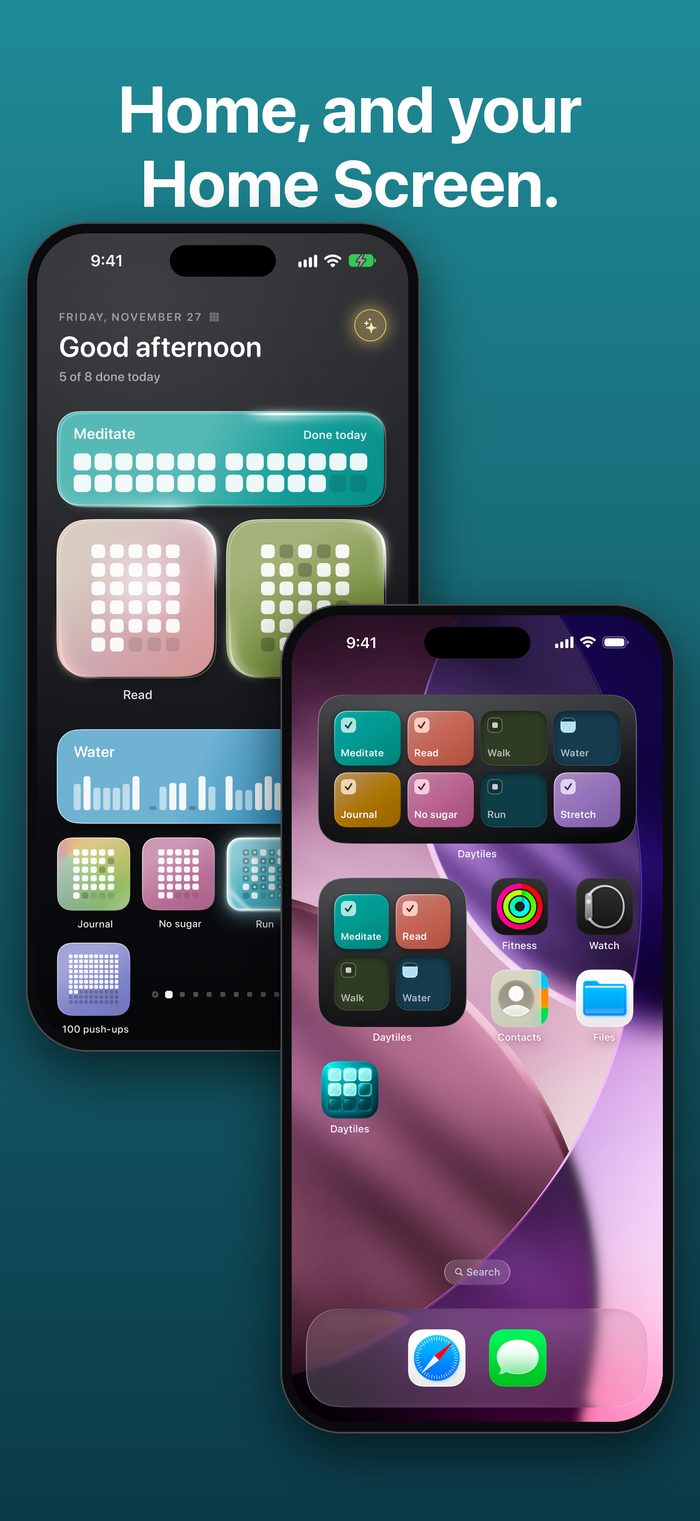
- Tap + on home and pick a ready-made habit, like Drink water or Read, or tap Make your own.
- Tap a habit's tile on home to open its page.
- Tap the big button under the month to check off today, or + to add to a total.
Then put it where you'll see it, so you rarely need to open the app:
- Home Screen widget. Add the Today widget in small, medium or large (4, 8 or 16 habits). Tap a tile to check it off or add one step.
- Lock Screen. Lock Screen widgets show one habit or a few, and a tap marks it done.
- Apple Watch. Today's habits as tiles to tap, plus a complication for your watch face. Turn on iCloud sync in Daytiles' Settings first.
- Control Center. Add "Mark a habit" or "Add to a habit".
- Siri and Shortcuts. Say "Log Water in Daytiles" or "Check off Read in Daytiles".
- Apple Health Pro. Link water, steps, exercise minutes, workouts, mindful minutes, toothbrushing or caffeine, and days other apps log check themselves off.
Habits that aren't daily are fine: pick weekdays, some days a week, set days or every few days. Sick or away? Skip a day or pause, and your streak is safe.
There's no account and nothing is collected. Your habits stay on your iPhone unless you turn on iCloud sync, which keeps them in step through your own iCloud. Daytiles is free for up to three habits, and Pro makes room for as many as you like.
Sources
Updated November 3, 2026. Daytiles is made by Jason, one person. Tell me if something here is wrong.